AtlassianTA
Special Workflow For Integration
Configures Jira with custom workflow statuses, roles, transitions, and an included QA workflow.
Tolga ArslanFree
Adds multiple remarks, status tracking, and PDF export to Jira issues for QA and bug tracking.
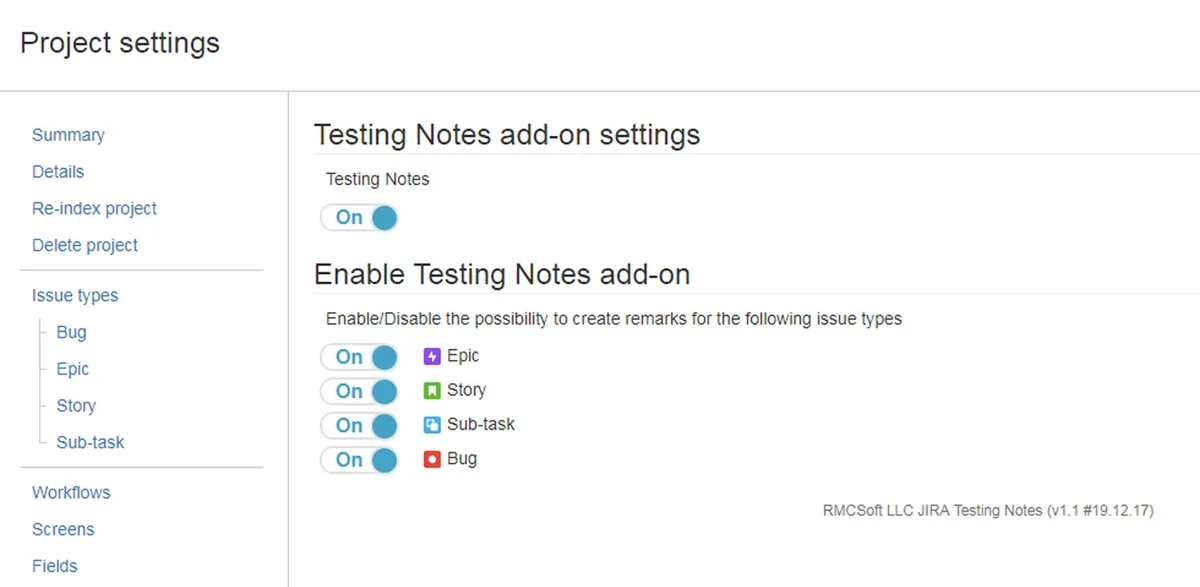
Testing Notes lets QA teams add and manage multiple remarks within Jira issues. Projects and issue types can be set up for creating remarks, which can be assigned statuses according to the bug-fixing lifecycle. The list of remarks can be exported as a PDF.
Adds several testing remarks within a single Jira issue.
Supports adding and managing remarks for bug fixing.
Exports the list of remarks in PDF format.
Allows remark statuses to be changed according to the outlined bug-fixing lifecycle.
QA teams.
1,328 plugins in Jira · Project Management
Price distribution: 444 free, 418 freemium, 466 paid
Configures Jira with custom workflow statuses, roles, transitions, and an included QA workflow.
Tolga ArslanImports a versioned workflow into Jira from the workflow settings.
Christian Parey
Schedules Jira issues into future sprints using team velocity and selected issue filters.
Add-On Experts Center
Export Jira project worklog data as CSV spreadsheets for Microsoft Excel and Google Drive.
Wruff«Testing Notes adds ability to put several remarks within one issue. It also helps understand the process of bug fixing based on remarks. Key features: setting up the projects and issue types available for creating remarks adding and managing new remarks for bug fixing exporting the list of remarks in PDF changing …»