AtlassianBU
BugShot Integration for Jira
Collects website bug reports, technical details, and screenshots, then sends them to Jira.
BugShotPaid
Create visual bug reports in Jira, collect technical details, and generate prompts for AI coding tools.
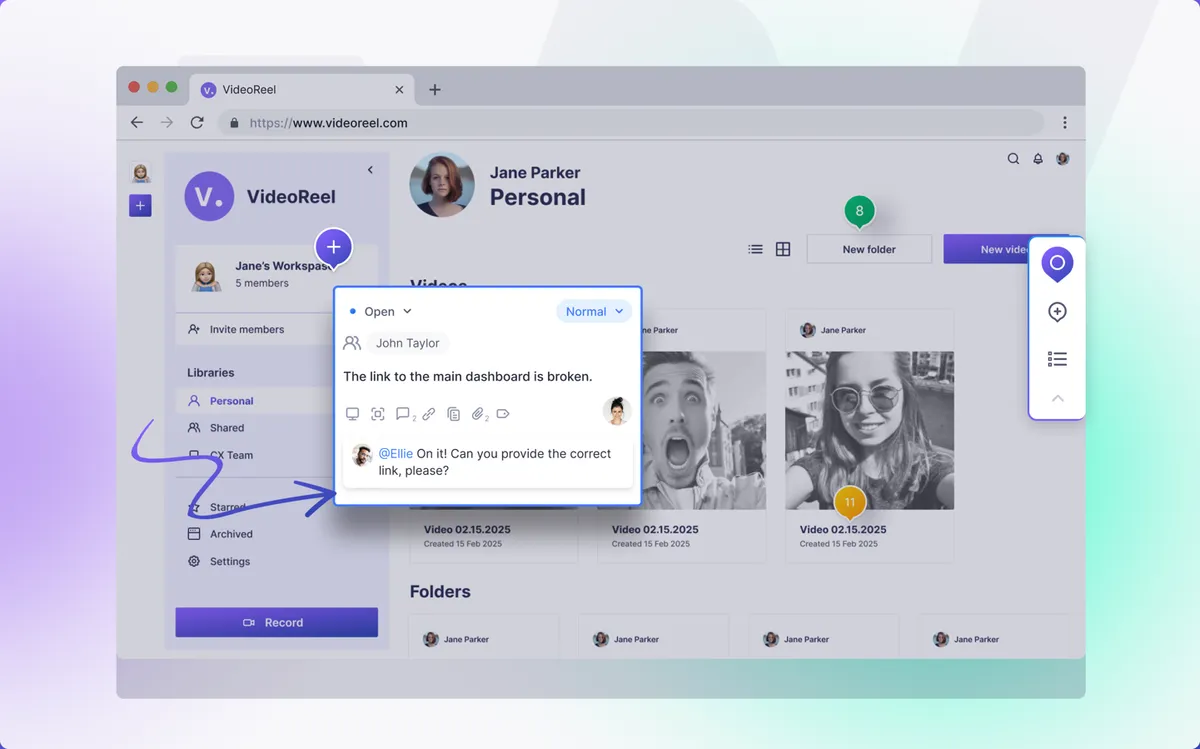
Webvizio for Jira lets users create visual tasks on live web pages and describe bugs or requested changes. It collects technical details for debugging and generates prompts for AI coding tools. The workflow uses a browser extension and supports previews at desktop, mobile, and tablet resolutions.
Create tasks directly on live web elements and add contextual feedback.
Collect technical information associated with a reported bug or requested change.
Generate prompts for AI coding tools such as Cursor, Tabnine, and Windsurf from Codeium.
Webvizio is for developers working on website bugs and code changes.
Webvizio is a paid, cloud-deployed Jira add-in updated in Apr 2024. BugShot Integration for Jira is also paid and cloud-deployed, was updated in Feb 2024. Send to AI+ for Jira is free and cloud-deployed, was updated in Jun 2026.
| Name | Pricing | Deployment | Updated |
|---|---|---|---|
| this plugin | Paid | Cloud | |
| BugShot Integration for Jira | Paid | Cloud | |
| Send to AI+ for Jira | Free | Cloud |
534 plugins in Jira · Software development
Price distribution: 254 free, 117 freemium, 163 paid
Collects website bug reports, technical details, and screenshots, then sends them to Jira.
BugShot
Send Jira issue details to AI chat, coding, desktop, and app-building tools.
Apps+
Capture visual bugs and feedback, then create and update Jira issues with screenshots, recordings, templates, and diagnostics.
Ajmera Infotech Inc.
Organizes Jira and JSM issues from multiple projects into shared queues with access controls and queue management.
Deviniti«Webvizio for Jira is a visual bug-reporting platform that automatically collects all technical info for debugging and generates AI prompts for AI coding tools. Get Started Today: 1️⃣ Install the Webvizio browser extension 2️⃣ Create visual tasks directly on a live web element, describe the bug or required changes in …»