Atlassian1D
ScriptFlow for Jira (SFJ)
Automates Jira workflows with JavaScript, event handlers, project rules, and event-triggered actions.
123x.devFreemium
Create Jira buttons that trigger workflows, subtasks, linked tickets, and checklists.
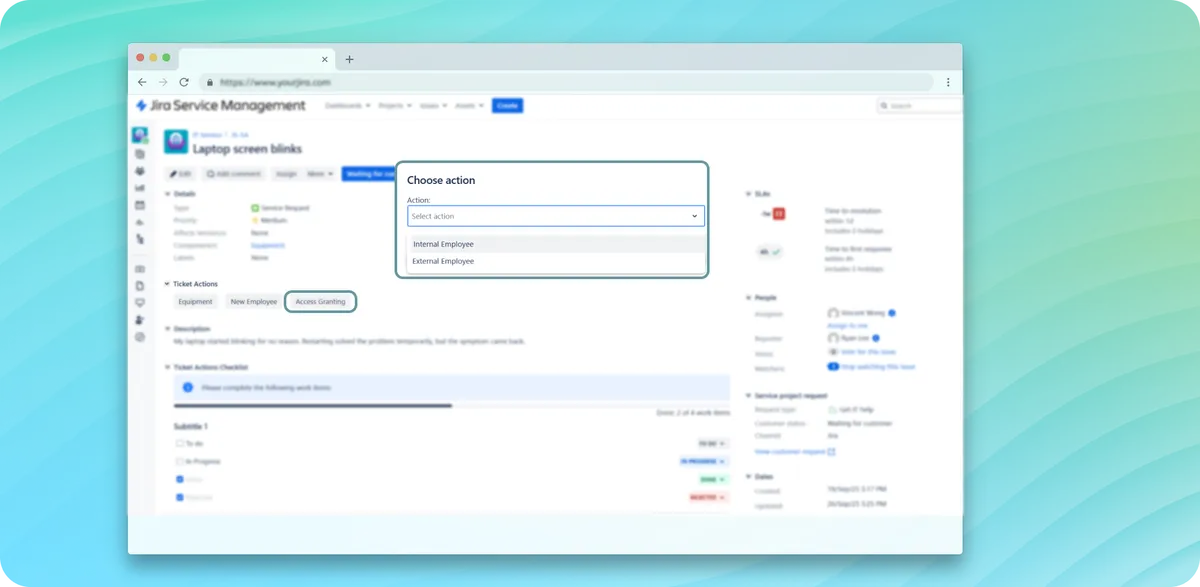
Ticket Actions adds configurable buttons to Jira issues that trigger structured workflows. A button can create subtasks, linked tickets, and checklists, with conditions based on project, issue type, or status. The add-in applies rules and field inheritance to generated items and includes a checklist module with optional Smart Checklist integration.
Buttons on Jira issues trigger configured workflows with a single click.
Configured actions can generate subtasks, linked issues, and checklists.
Conditions can be based on project, issue type, or status.
Rules and field inheritance can be applied to objects created by an action.
The add-in includes a built-in checklist module and optional Smart Checklist integration.
Ticket Actions is a paid Jira add-in deployed in data center, while ScriptFlow for Jira (SFJ) is freemium and deployed in the cloud. Ticket Actions was updated in Sep 2025, while ScriptFlow for Jira (SFJ) was updated in Jan 2025.
| Name | Pricing | Deployment | Updated |
|---|---|---|---|
| this plugin | Paid | Data Center | |
| ScriptFlow for Jira (SFJ) | Freemium | Cloud |
267 plugins in Jira · Project Management
Price distribution: 103 free, 41 freemium, 123 paid
Automates Jira workflows with JavaScript, event handlers, project rules, and event-triggered actions.
123x.dev
Organizes Jira and JSM issues from multiple projects into shared queues with access controls and queue management.
Deviniti
Scheduled Jira exports create reports with custom fields, change history, and delivery by email, SFTP, download link, or API.
Advanced Insights
Embed shared Microsoft Power BI links in Jira issue tabs and dashboards with notes, images, PDFs, and other apps.
Apps+«Ticket Actions empowers teams to execute structured workflows in Jira with a single click. Instead of relying on manual steps or complex automation rules, configure buttons that create subtasks, linked tickets, and checklists automatically. Apply conditions based on project, issue type, or status to ensure the right …»