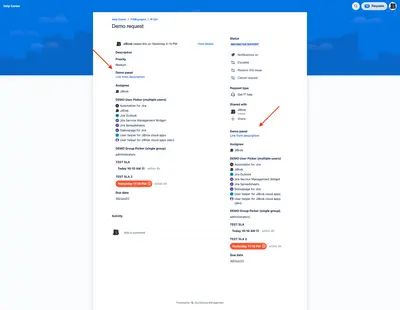
Fields panel for Jira Service Management (JSM)
Displays Jira Service Management issue fields, HTML messages, and related issues on the customer portal.
JiBrokPaid
Capture workflow changes, approvals, and field baselines in table custom fields for Jira.
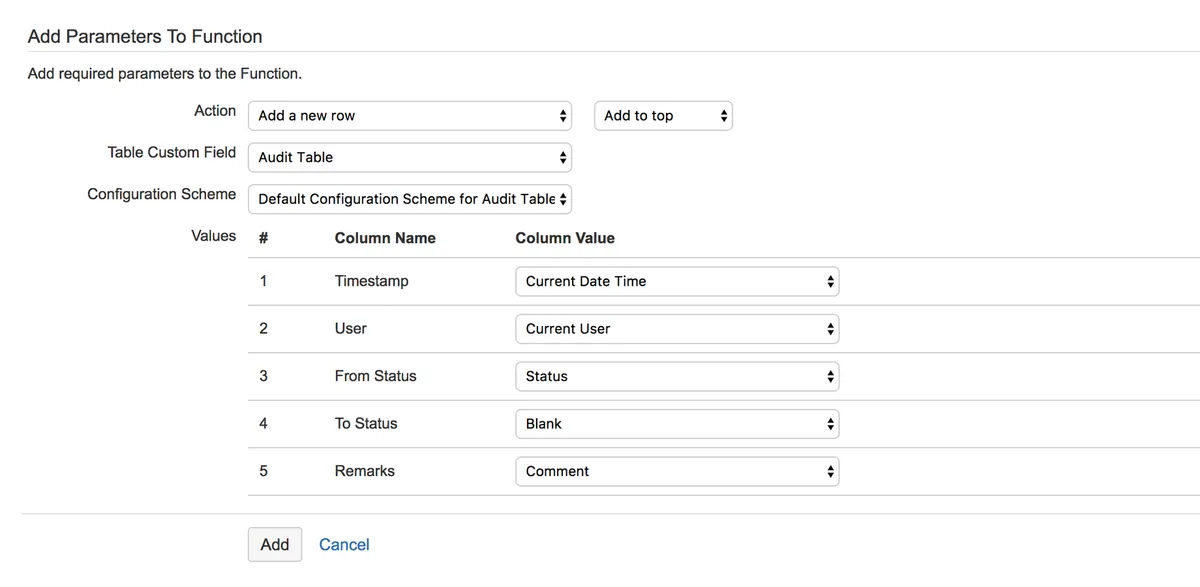
Table Custom Fields for Jira groups related fields in a configurable table within Jira. Workflow post functions can add, update, or delete rows, clear the table, and populate values from system fields, custom fields, the current datetime, or current users. The table can record approval information, audit entries, and field snapshots during workflow changes. Values can be non-editable and populated automatically through workflow post functions.
Workflow post functions can add, update, or delete rows and clear the table.
Post functions can populate the top or last row with system fields, custom fields, the current datetime, or current users.
Associated fields can be consolidated into a table with configurable columns.
Approval information can be stored in a table custom field, with values populated automatically and marked non-editable.
Field snapshots can be captured at different lifecycle states.
Table Custom Fields for Jira is paid and deploys to Data Center and Server, while Fields panel for Jira Service Management (JSM) is paid and deploys to Cloud.
| Name | Pricing | Deployment | Updated |
|---|---|---|---|
| this plugin | Paid | Data Center · Server | |
| Custom Fields | Paid | Cloud | |
| Fields panel for Jira Service Management (JSM) | Paid | Cloud |
495 plugins in Jira · Administrative tools
Price distribution: 157 free, 126 freemium, 212 paid
Displays Jira Service Management issue fields, HTML messages, and related issues on the customer portal.
JiBrok
Organizes Jira and JSM issues from multiple projects into shared queues with access controls and queue management.
Deviniti
Scheduled Jira exports create reports with custom fields, change history, and delivery by email, SFTP, download link, or API.
Advanced Insights
Embed shared Microsoft Power BI links in Jira issue tabs and dashboards with notes, images, PDFs, and other apps.
Apps+«For approval tracking - easy tracking instead of having to reconstruct the changes from the Change History tab. For audit tracking - serves as an audit log as it is non-editable and the values populated automatically via workflow post functions. Baseline tracking - capture snapshots of important fields at various …»