AtlassianIB
Personal Sticky Notes
Adds private notes and reminders to Jira issues through a personal sticky note panel.
Involit Bilişim A.Ş.Free
Store personal notes and reminders on Jira work items, with HTTPS links converted to clickable links.
Quick Notes stores personal notes on Jira work items. Notes are entered in a text area and saved with an Add Note button, then displayed below the input. Notes can be edited or deleted, and HTTPS links are converted into clickable links. Notes are associated with the work item and are personal to each user, but they are not private.
Users can store personal notes on any Jira work item.
Saved notes can be edited or deleted.
HTTPS links in notes are automatically converted into clickable links.
Notes can record progress, thoughts, reminders, and reference links for a work item.
Quick Notes is intended for teams and individuals tracking thoughts and context on Jira work items.
Quick Notes is free and cloud-deployed, as is Personal Sticky Notes; Quick Notes was updated in Apr 2026, while Personal Sticky Notes was updated in May 2026. 📓 Private Notepad for Jira and Secure Vault for Jira are freemium and cloud-deployed, while Quick Notes is free. Work Item Calendar for Jira and Simple Cloud Files Jira are paid and cloud-deployed.
| Name | Pricing | Deployment | Updated |
|---|---|---|---|
| this plugin | Free | Cloud | |
| Personal Sticky Notes | Free | Cloud | |
| Secure Vault for Jira | Not in catalog | ||
| Work Item Calendar for Jira | Paid | Cloud | |
| Simple Cloud Files Jira | Paid | Cloud | |
505 plugins in Jira · Content and communication
Price distribution: 127 free, 198 freemium, 180 paid
Adds private notes and reminders to Jira issues through a personal sticky note panel.
Involit Bilişim A.Ş.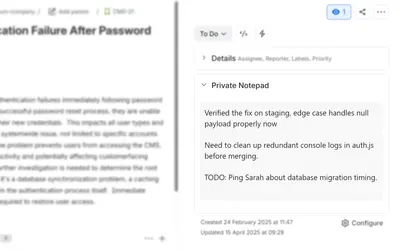
Add private notes and drafts inside Jira issues, with automatic saving and a personal workspace.
ChiliShelfManage and visualize Jira work items in calendar views with filters, status markers, and date fields.
ALDEVA DIGITAL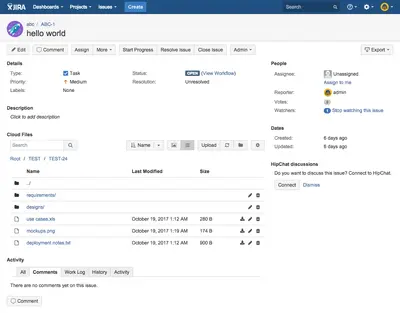
Store Jira project and issue files in Amazon S3 with folders and project-level permissions.
Top Shelf Solutions«Quick Notes is a free Jira app that helps users stay organized by storing personal notes on any work item. How it works: Add notes using a simple text area and "Add Note" button Saved notes appear below the input area for easy reference Edit or delete notes at any time HTTPS links are automatically converted to …»