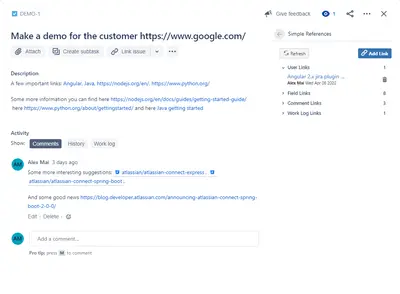
Simple Links For Jira
Add and remove web-resource links in Jira, then view them from issue fields, comments, and work logs.
E-MarketTownPaid
Pin Jira issue comments and attachments above other comments, with pin history and dedicated views.
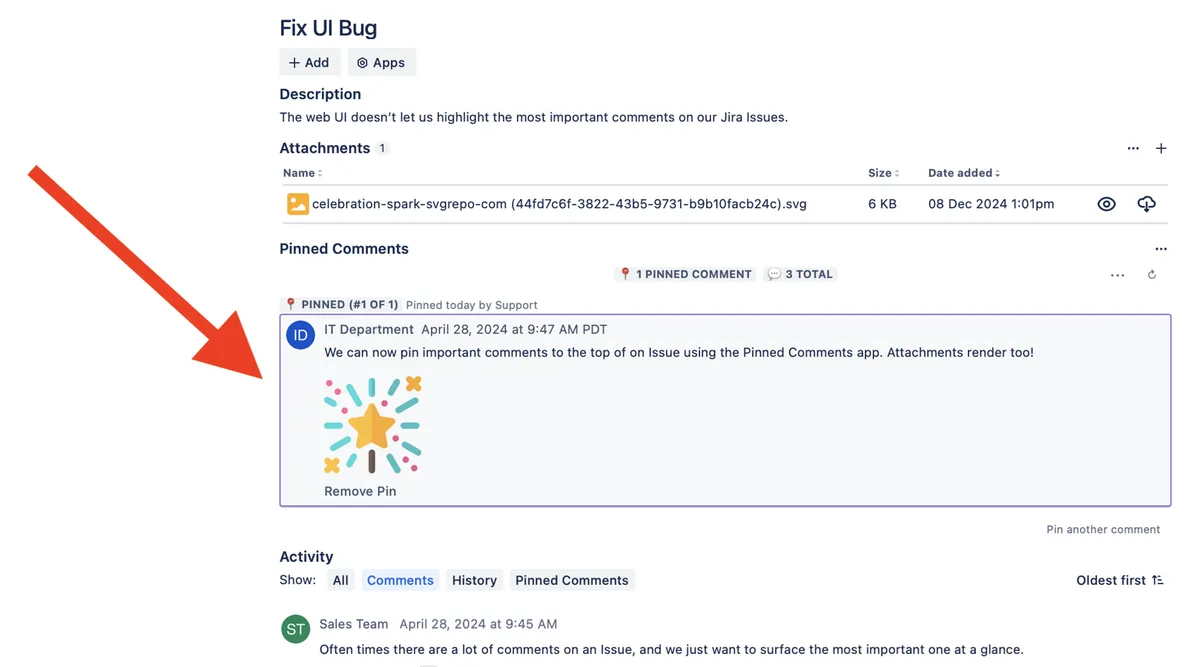
Pinned Comments places selected comments and attachments at the top of Jira issues. It records who pinned a comment and when. Pinned comments can be viewed in an Issue Panel, an Issue Context box, or a dedicated Issue Activity tab. Comments can also be pinned automatically through Jira Automations.
Selected comments can be placed above other comments on a Jira issue.
Attachments can be pinned to the top of a Jira issue.
The add-in records who pinned a comment and when.
Pinned comments can be viewed through the Issue Panel, Issue Context box, or Issue Activity tab.
The dedicated Issue Activity tab allows pins to be added and removed.
Comments can be pinned from inside Jira Automations.
1,002 plugins in Jira · Administrative tools
Price distribution: 271 free, 275 freemium, 456 paid
Add and remove web-resource links in Jira, then view them from issue fields, comments, and work logs.
E-MarketTown
Organizes Jira and JSM issues from multiple projects into shared queues with access controls and queue management.
Deviniti
Scheduled Jira exports create reports with custom fields, change history, and delivery by email, SFTP, download link, or API.
Advanced Insights
Embed shared Microsoft Power BI links in Jira issue tabs and dashboards with notes, images, PDFs, and other apps.
Apps+«Pin important comments and attachments to the top of your issue. Record who pinned the comment and when. View pinned comments at a glance using either the Issue Panel above comments, or the Issue Context box to the right of your Issue. View pinned comments in context using the Pinned Comments Issue Activity tab . Pin …»