
Default Values | Auto-Fill Fields for Jira
Auto-fills Jira issue fields with preset values based on project and issue type.
KalauxFreemium
Auto-fills selected Jira fields from historical ticket data when users create new tickets.
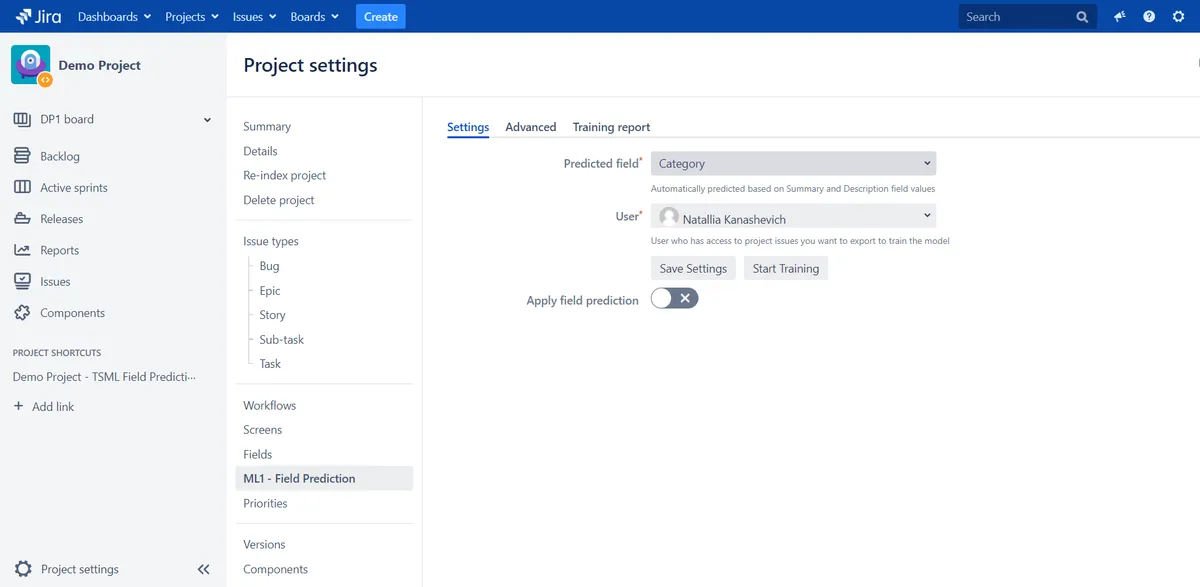
ML1 collects data from historical Jira tickets and sends it to an ML server. The server uses ticket summaries and descriptions to create a training model, which predicts values for selected fields when new tickets are created. Models can be trained or retrained manually or on a schedule. Training reports show model performance, status, errors, and duration.
ML1 predicts and fills selected Jira fields when users create new tickets.
Predictions can cover fields such as labels, categories, and version pickers.
Different fields can be predicted for different Jira projects.
Models can be trained and retrained manually or according to a custom cron schedule.
A maximum number of issues can be set for model training.
Reports display training performance, status, errors, and duration.
Jira users.
1,002 plugins in Jira · Administrative tools
Price distribution: 271 free, 275 freemium, 456 paid
Auto-fills Jira issue fields with preset values based on project and issue type.
Kalaux
Create Jira custom fields that validate text and numbers with regex rules or let users pick issues and versions.
MOY Apps
Automates Jira workflows with custom post functions, conditions, validators, and field management.
White Software
Builds no-code validators, conditions, and post functions for Jira workflows.
Deviniti«ML1 allows you to automate your Jira Ticket creation. How it works: ML plug-in collects historical data from Jira tickets and sends it to the ML server; ML Server uses summary and description fields from historical data to create a training model; After the model is successfully trained, The ML plug-in starts to …»