
Queues for Jira & JSM
Organizes Jira and JSM issues from multiple projects into shared queues with access controls and queue management.
DevinitiFreemium
Add locations to Jira issues and display them in a map gadget.
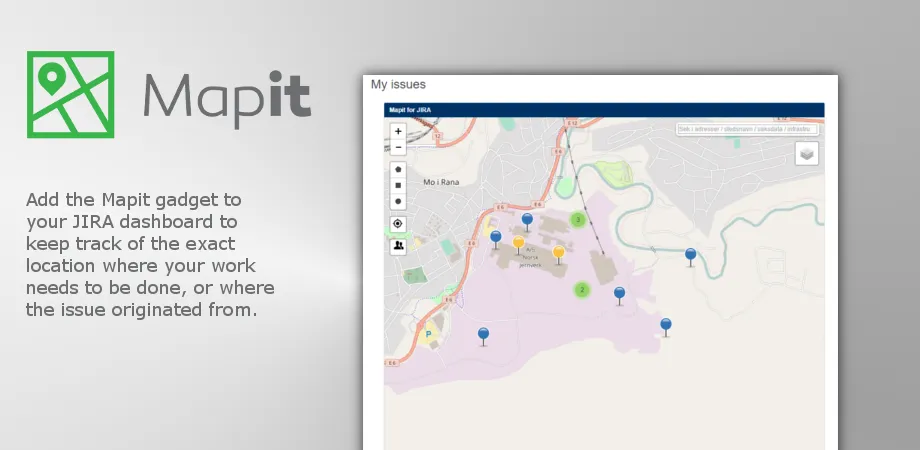
Mapit assigns geographic positions to Jira issues and presents them on a map. Map views can use issues from configured filters, with pin colors indicating status or priority. Issues can be created or repositioned from the map, and selected items can be opened in Jira's issue navigator. The add-on supports Jira Server and Data Center and requires an internet-connected Jira server.
Adds geographic coordinates to Jira issues.
Shows located issues in a map gadget using Leaflet and OpenStreetMap.
Uses Jira filters to determine which located issues appear in Mapit.
Uses different pin colors to represent issue status or priority.
Creates Jira issues from the map or from the location attached to an image.
Changes an issue's location by moving its marker on the map.
Plans a route through multiple issues and opens it in Google Maps.
Allows additional map sources, ArcGIS data, and Insight Asset Management integration.
1,328 plugins in Jira · Project Management
Price distribution: 444 free, 418 freemium, 466 paid
Organizes Jira and JSM issues from multiple projects into shared queues with access controls and queue management.
Deviniti
Scheduled Jira exports create reports with custom fields, change history, and delivery by email, SFTP, download link, or API.
Advanced Insights
Embed shared Microsoft Power BI links in Jira issue tabs and dashboards with notes, images, PDFs, and other apps.
Apps+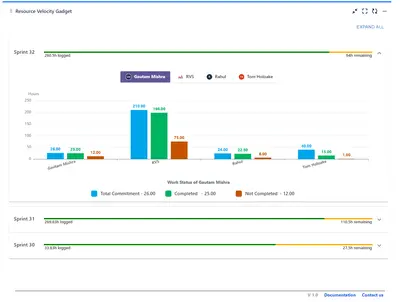
Track sprint progress and team velocity in Jira with dashboard gadgets, charts, and status views.
RVS Softek«Put your Jira issues on the map By geotagging your Jira issues, you can keep track of the exact location where work needs to be done, or where the issue originated from. Mapit shows these issues in a map gadget powered by Leaflet and OpenStreetMap. Support for Server and Data Center Display geotagged issues from your …»