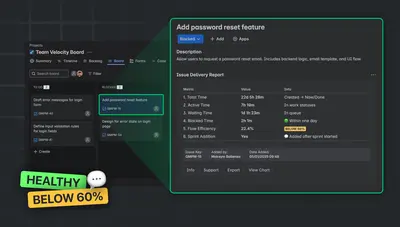
Issue Delivery Report – Flow Metrics for Jira
Analyze Jira issue delivery time with flow metrics, status charts, sprint checks, and report exports inside the issue view.
TypeSwitchPaid
Shows how long Jira issues have remained in their current status and time spent in previous statuses.

Displays the time an issue has spent in its current status in the Jira issue panel. Clicking the add-on glance shows time spent in other statuses. The add-on is free and a planned paid version is described as including reports, dashboards, and JQL support.
Displays the duration of an issue's current status in the issue's right panel.
Shows time spent in each status through the issue context panel.
Uses a visual indicator to present the duration of the current status.
Issue Time in Status is free and cloud-only, while Issue Delivery Report – Flow Metrics for Jira is paid, cloud-only, and updated May 2026. Status Time Reports - Time in Status is paid and available on data-center, cloud, and server. Temponia is also free and cloud-only, while Clockify: Time Tracking & Timesheet is free across server, cloud, and data-center and was updated Dec 2021.
| Name | Pricing | Deployment | Updated |
|---|---|---|---|
| this plugin | Free | Cloud | |
| Issue Delivery Report – Flow Metrics for Jira | Paid | Cloud | |
| Status Time Reports - Time in Status | Paid | Cloud · Data Center · Server | |
| Temponia | Price not published | Cloud | |
| Clockify: Time Tracking & Timesheet | Free | Cloud · Data Center · Server |
1,328 plugins in Jira · Data and analytics
Price distribution: 444 free, 418 freemium, 466 paid
Analyze Jira issue delivery time with flow metrics, status charts, sprint checks, and report exports inside the issue view.
TypeSwitch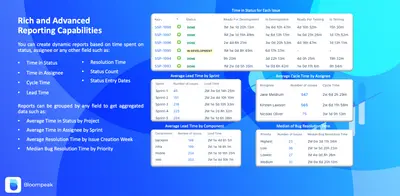
Create Jira reports and gadgets showing time in statuses, assignees, cycle time, and lead time.
Bloompeak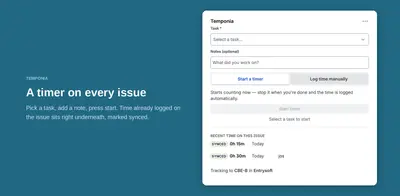
Track time on Jira issues, sync worklogs with Temponia, and manage approvals, invoicing, and reporting in Temponia.
TemponiaConfigures Jira with custom workflow statuses, roles, transitions, and an included QA workflow.
Tolga Arslan«Easy to use as it requires no further setup to installing it. You just view the time the issue has spent on the current status on the right panel of the issue view. If you want to see how much time is spent in other statuses, you just click the glance. Status Duration: Find the duration in the current status through a …»