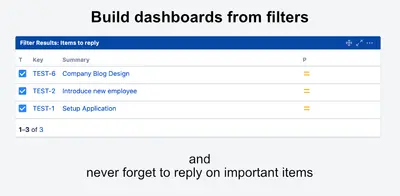
User Mentioned JQL
Filter Jira issues by recent mentions, reply status, or mentions of specific users.
SimtaskPaid
Adds a Boolean custom field to Jira with True or False values and a default of False.
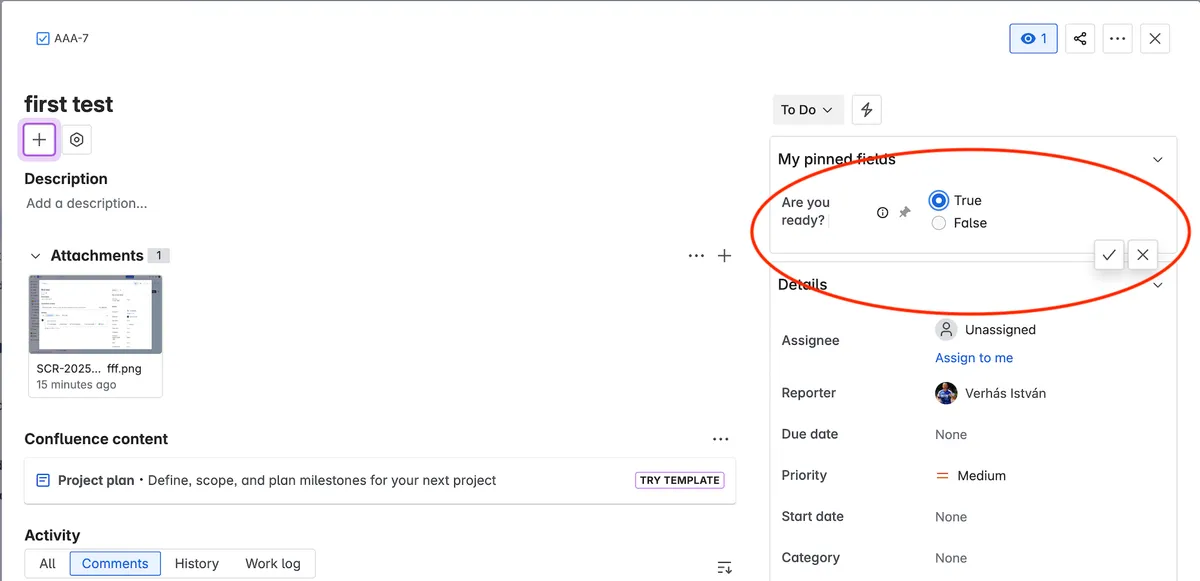
Adds a Boolean custom field type in Jira. Values can be True or False, with False as the default. Administrators can create the field through Jira's standard administration UI, and users can select the value on the Jira view page.
The custom field accepts either True or False.
New fields use False as the default value.
The field can be created through Jira's standard administration UI.
Users can select True or False on the Jira view page.
Boolean Custom Field Type and User Mentioned JQL are both paid listings. Boolean Custom Field Type is deployed in cloud, while User Mentioned JQL is deployed in data-center and server.
| Name | Pricing | Deployment | Updated |
|---|---|---|---|
| this plugin | Paid | Cloud | |
| User Mentioned JQL | Paid | Data Center · Server |
505 plugins in Jira · Administrative tools
Price distribution: 127 free, 198 freemium, 180 paid
Filter Jira issues by recent mentions, reply status, or mentions of specific users.
Simtask
Organizes Jira and JSM issues from multiple projects into shared queues with access controls and queue management.
Deviniti
Scheduled Jira exports create reports with custom fields, change history, and delivery by email, SFTP, download link, or API.
Advanced Insights
Embed shared Microsoft Power BI links in Jira issue tabs and dashboards with notes, images, PDFs, and other apps.
Apps+«Boolean custom field type in Jira. The value is either True or False. The default value is False. Easy to create a new custom field as a boolean value using the standard Jira administration UI. The end user can select the True or False value on Jira view page natively.»