Lightning Universal Tagging
Add and browse custom tags on standard or custom records in Salesforce Platform.
Salesforce LabsFree
Generate barcodes and QR codes from Salesforce fields and objects, with PDF attachment and email options.
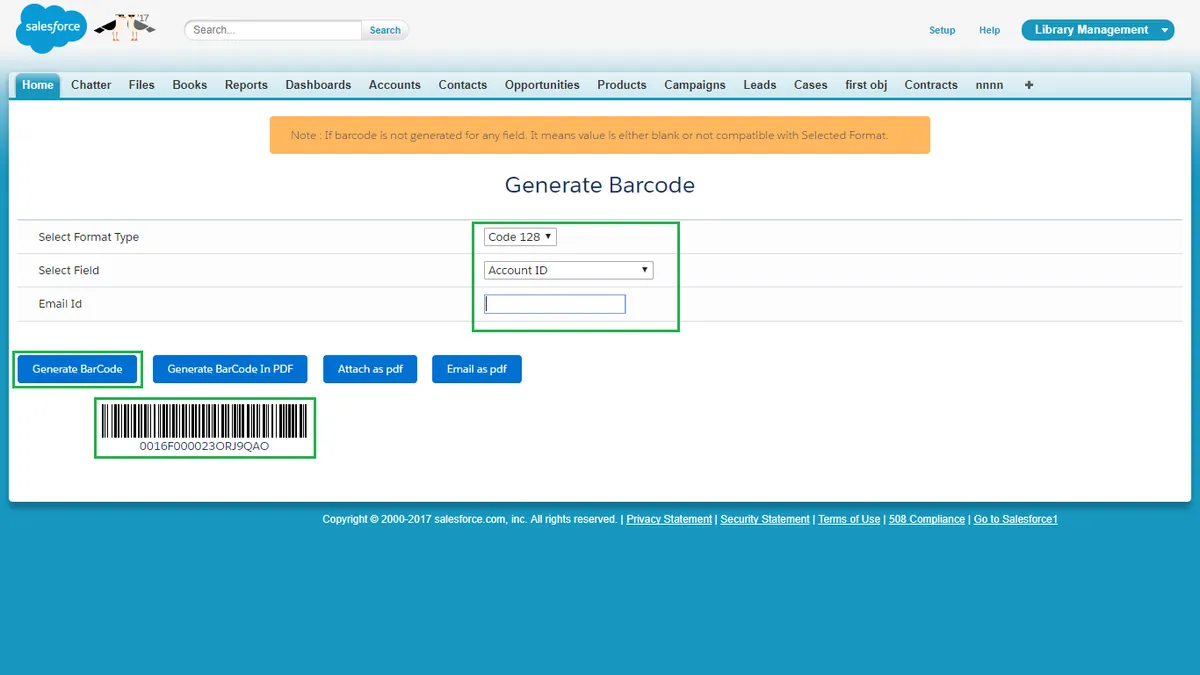
Generates barcodes and QR codes from fields on standard and custom Salesforce objects. The output can be created in PDF format, attached to the related sObject, or emailed as a PDF to a specified address. Multiple records can be selected from an sObject list view for batch barcode generation.
Generates a barcode or QR code from any field on a Salesforce object.
Works with standard and custom Salesforce objects.
Creates barcode or QR code output in PDF format.
Attaches generated PDF codes to the related sObject.
Emails generated barcode or QR code PDFs to a specified address.
Generates barcodes for multiple records selected from an sObject list view.
Smart Barcode and QR code generates codes from any field and object, attaches them to records as PDFs, emails them as PDFs, and supports multiple records from a list view. Barcode and QR Code Generator displays barcodes in Lightning, Classic, and Community pages and uses Barcode Config records for display.
| Name | Pricing | Deployment | Updated |
|---|---|---|---|
| this plugin | Free | Cloud | |
| Barcode and QR Code Generator | Free | Cloud |
642 plugins in Salesforce Platform · Productivity
Price distribution: 308 free, 63 freemium, 271 paid
Add and browse custom tags on standard or custom records in Salesforce Platform.
Salesforce Labs
Create responsive Salesforce forms from Fieldsets for Lightning App, Home, and Record Pages.
Salesforce Labs
Manage Salesforce record notes on one page, including creation, viewing, editing, deletion, and drag-and-drop movement.
Cloud Certitude
Apply labels to Salesforce Platform records manually or through rules triggered by creation and updates.
adelforce«1. Users can generate Barcode/QR Code for any field and for any object in Salesforce. 2. Also generate Barcode/QR Code for any field and for any object in PDF format. 3. Users can generate a barcode/QR Code for the field and attach it as PDF for that particular sObject. 4. Also generate Barcode/QR Code for any field …»