
Auto Numbered Headings
Number headings, page titles, tables, images, equations, and examples in Confluence.
HivestonePaid
Add automatically numbered captions and linked references to items in Confluence.
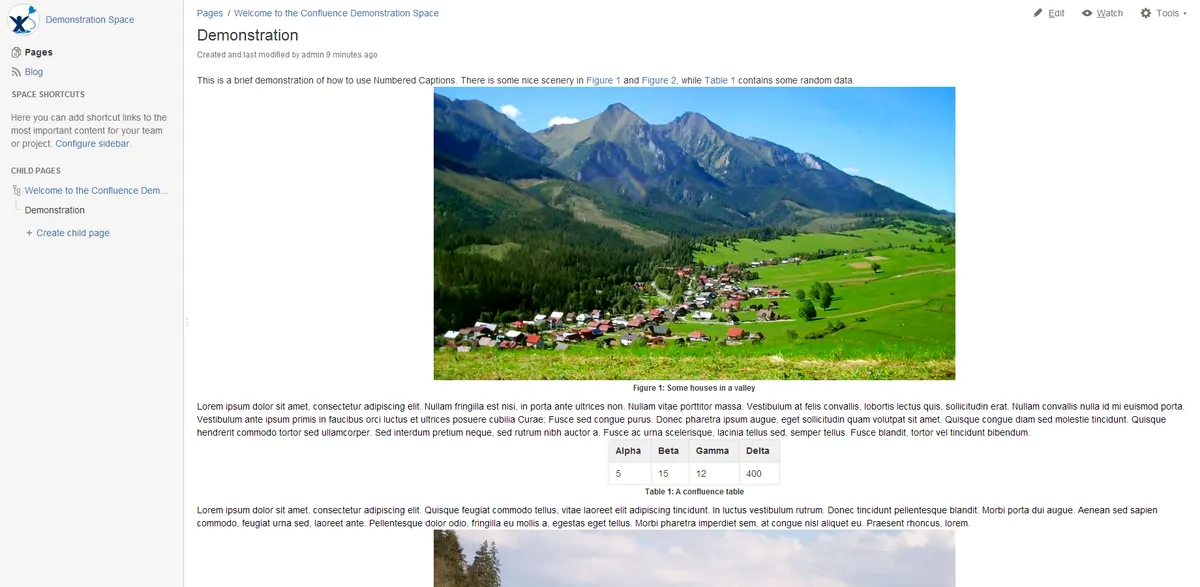
Adds formatted captions to pictures, tables, and other selected items in Confluence. Caption numbers increment separately for each item type, such as figures and tables. A Caption Reference macro links to captioned items, including items on other pages. Captions can be added by selecting an item and choosing the caption option from the Insert menu.
Adds formatted captions to selected pictures, tables, and other items.
Increments caption numbers separately for each caption type.
Links to captioned items through a Caption Reference macro, including items on other pages.
Numbered Captions is freemium and supports data-center, cloud, and server deployment, while Auto Numbered Headings is paid and supports data-center and server deployment. Table Of Contents Wizard is freemium and supports cloud deployment, while Numbered Captions supports all three listed deployment types. Numbered Captions was updated in Sep 2026, compared with Jun 2026 for Table Of Contents Wizard and Jan 2026 for Auto Numbered Headings.
| Name | Pricing | Deployment | Updated |
|---|---|---|---|
| this plugin | Freemium | Cloud · Data Center · Server | |
| Auto Numbered Headings | Paid | Data Center · Server | |
| Table Of Contents Wizard | Freemium | Cloud |
990 plugins in Confluence · Content and communication
Price distribution: 228 free, 378 freemium, 384 paid
Number headings, page titles, tables, images, equations, and examples in Confluence.
Hivestone
Add image captions with permalinks and CSS styling in Confluence.
Benryan Software Inc.
Create clickable outlines, numbered headings, and configurable tables of contents in Confluence Cloud.
Crenwiz
Automatically numbers Confluence headings with configurable styles, skip rules, and per-page settings.
Aptify Tech«Select a picture, table, or other item then select Insert->Insert caption. It's that easy to add a formatted, automatically numbered caption. Captions will be numbered incrementally for each caption of the same type (Figure, Table, etc). Captioned items can be linked to by using the Caption Reference macro (even from …»